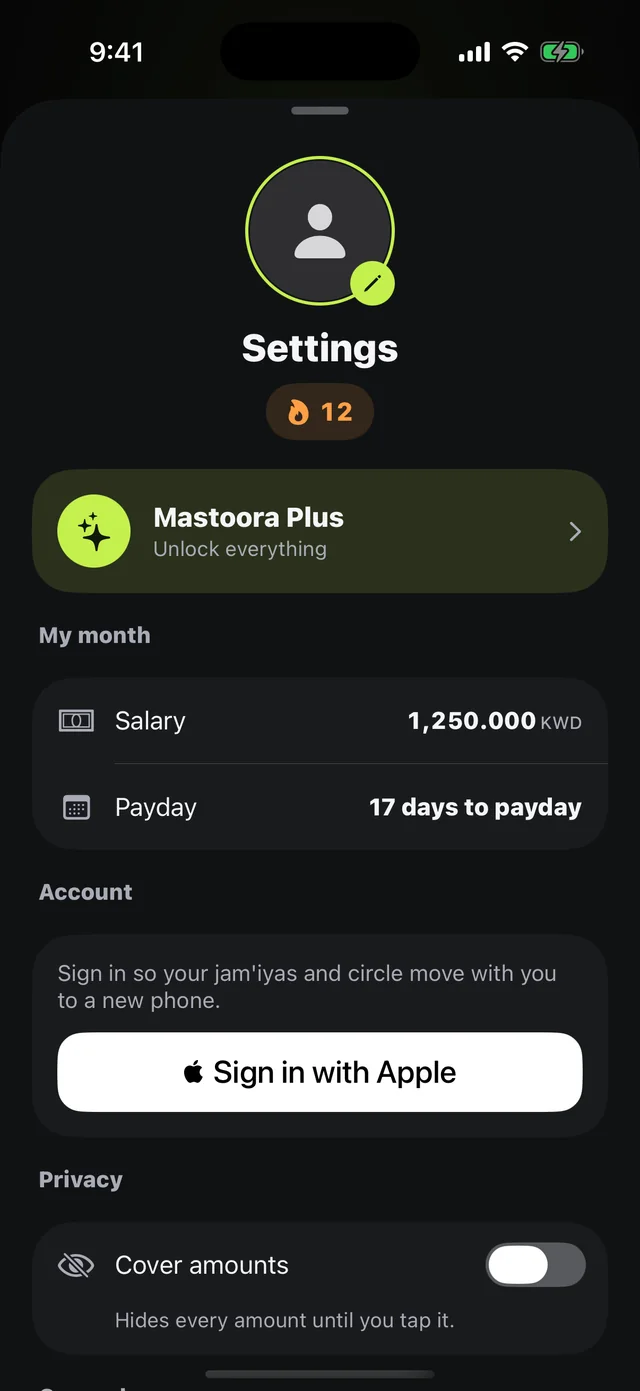
Cover amounts
Your numbers stay covered. Literally.
The name is a promise: mastoora means "covered" in Arabic. Your salary, spending, and commitments never leave your phone, and Cover amounts hides them even from whoever's sitting next to you.
 Download on the App Store
Free on iPhone · iOS 18.0 or later
Why it matters
Cover amounts
One switch in Settings hides every amount until you tap the number.
On your device
Salary, spending, and commitments are saved in a file on your phone only.
No bank
We never ask for a bank login and never read bank messages.
Jam'iya and circle
They share your name, status, streak, and jam'iya details only — not one number from your budget.
No email needed
An anonymous account is created automatically; Sign in with Apple is optional, to move your jam'iyas to a new phone.
No ads
No ads and no advertising trackers in the app.
How to use it
- 1
Open Settings
From your picture at the top of the home screen.
- 2
Privacy
Turn on Cover amounts.
- 3
Tap a number to see it
Every amount goes back to covered afterward.
Questions about this feature
What exactly reaches the server?+
The name your family sees, your character number, your status, streak, and last logged day, and details of the jam'iyas and circle you're in. Everything is listed in the Privacy Policy.
If I delete the app, are my numbers gone?+
Yes, because they live on your device only — unless your iPhone has an iCloud backup.
More features
Keep your month covered
Download Mastoora, add your commitments in a minute, and see your real number for today.
Download on the App StoreFree on iPhone · iOS 18.0 or later